SVN Version Control Setup
Get connected to the team repository in 5 minutes
Leaderboard
Compete with fellow mappers and see who's leading in XP, commits, and achievements.
View Rankings →Latest Changes
Recent commits and updates to the BoraBora map. Stay informed on team progress.
See Recent Commits →Map Status & Roadmap
Track BoraBora's development progress and see what's planned, in progress, or completed.
View Roadmap →Project Board
Manage tasks, track progress, and collaborate on the Kanboard.
Open Board →Team Members
Meet the MapLabs crew and see who's working on what.
View Team →SVN Setup Guide
First-time setup guide for terrain editors and mod packers.
Open Setup Guide →DZ Academy ToolZ
RVMat Generator v2.0, Config Creator, and other DayZ development tools.
View Tools →Discord Quick Links
Jump directly to mapping channels and voice rooms.
View Links →Submit Feedback
Share ideas, report issues, or suggest improvements.
Give Feedback →🆕 First-Time Setup Guide
Complete step-by-step instructions for getting started with BoraBora
Choose Your Role
Terrain Editors & Modders
You work on the map itself
Editing terrain, placing objects, working on mods, or QGIS. If you open TerrainBuilder or touch any source files, this is your checkout.
svn://maplabs.loginto.me/BoraBora/source
Mod Packers & Server Admins
You pack PBOs and deploy
You pack PBOs using Addon Builder and deploy them to the server. You don't edit raw source files — you take what terrain editors produce and make it playable.
svn://maplabs.loginto.me/BoraBora/deploy
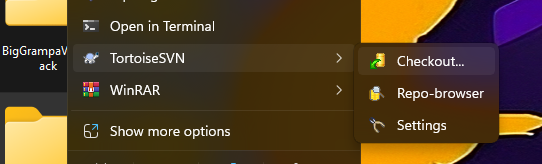
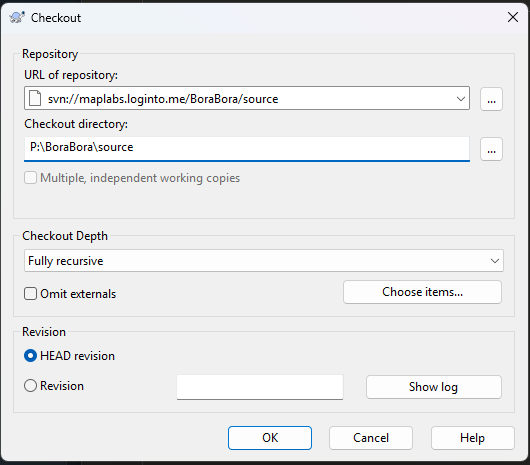
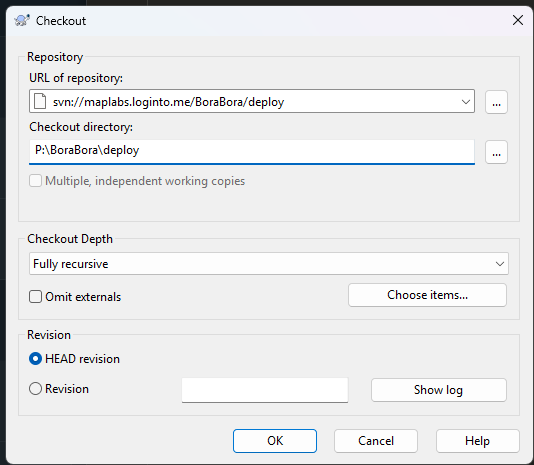
📅 Day-to-Day Use
Once checked out, your normal workflow is:
Right-click your checkout folder → SVN Update to get the latest files
Right-click → SVN Commit to save your work to the server
Right-click → TortoiseSVN → Revert to undo your local changes
🔧 Troubleshooting
Check you are on the right network. The SVN server is only accessible internally. If you're remote, you may need VPN access.
Delete your old checkout folder and do a fresh checkout from the new URL above (/source or /deploy).
Right-click → TortoiseSVN → Resolve Conflicts, or ask the team lead for help.
If you open TerrainBuilder = source
If you run Addon Builder = deploy
Map Status & Roadmap
Track BoraBora's development progress
Overall Progress
Development Board
Project Board
BoraBora development task management
🔐 Kanboard Quick Login
Save your Kanboard credentials for quick access
Team Members
Meet the MapLabs crew and understand our workflow
Core Team (0)
Confirmed active contributors · Real-time online status from Discord
Team Structure & Workflow
Clear roles, smooth workflow, and productive collaboration. This structure keeps the team small (3-6 members), focused, and conflict-free.
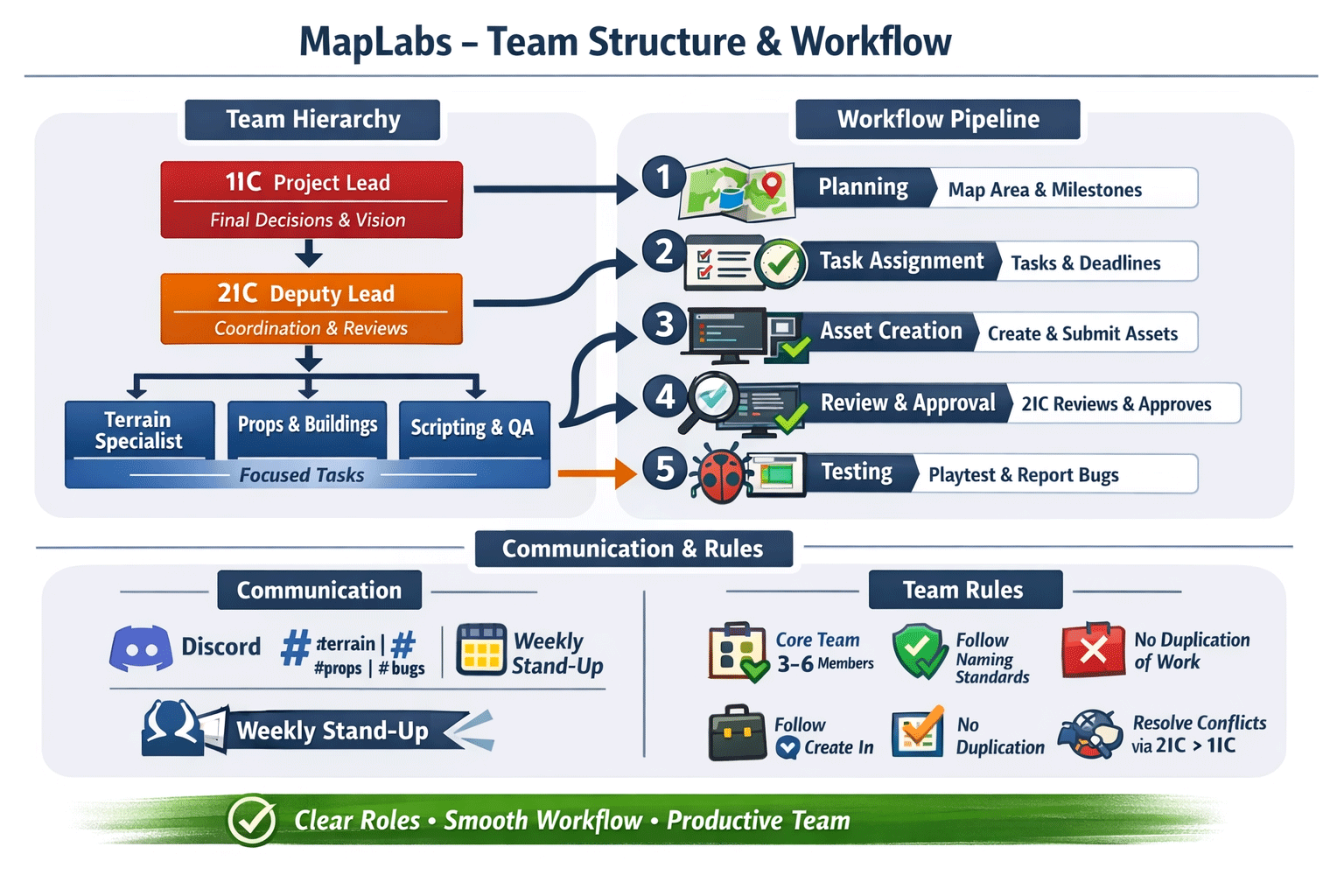
Overall vision, final decisions, quality control, conflict resolution. Final say on all map decisions.
Support lead, coordinate daily operations, review assets before submission, assist in conflict mediation. Can make minor decisions within assigned areas.
Terrain: Create terrain, adjust elevation, textures, biomes
Props/Buildings: Design and place buildings, props, objects
Scripting/Mod Integration: Implement scripts, triggers, gameplay mechanics
QA/Playtesting: Test map areas, report bugs and improvements
- Planning - Define map area, key points, milestones
- Task Assignment - Break work into small tasks with deadlines (tracked on Kanboard)
- Asset Creation - Create and submit assets following style guide and naming conventions
- Review & Approval - 2IC reviews weekly, only approved assets merge to main map
- Testing - Regular playtests, feedback entered into task board
- Core Team: 3-6 active members maximum (quality over quantity)
- Follow Standards: Asset naming conventions and style guides must be followed
- No Duplication: Check with 2IC before creating new assets to avoid duplicate work
- Weekly Stand-Up: 5-10 minutes to review progress and blockers
- Conflict Resolution: DM 2IC → escalate to 1IC if unresolved
- Communication: Use Discord channels: #terrain, #props, #bugs, #general
Submit Feedback
Share your ideas, report issues, or notify the team
💬 Quick Discord Links
Need to discuss something? Jump directly to the relevant Discord channel:
👤 Your Profile
Loading...
🎖️ Badges (0)
🏆 Leaderboards
Compete with fellow mappers and track your progress
Loading leaderboard...
🔐 Admin Dashboard
Manage team members, roadmap, XP system, and admin access (Admin Only)
👥 Team Management
Add, edit, or remove team members. Changes save to team.json and update the Team tab immediately.